

UPDATE: settings for all devices
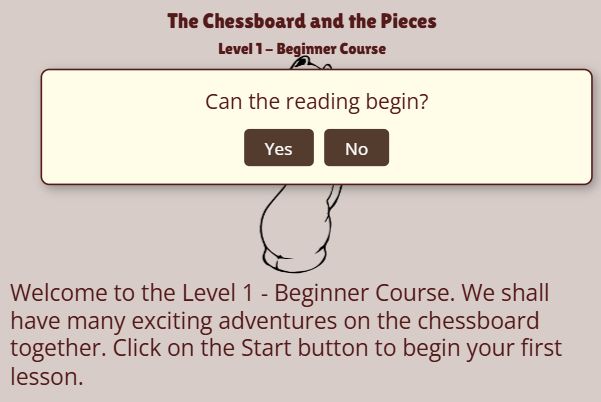
Now, instead of reading the annotations and explanations, you can sit back and listen as the lesson unfolds.
We are thrilled to announce a feature many of you have been waiting for. At LearningChess.net, our mission has always been to make high-quality chess education accessible, engaging, and effective for everyone. Today, we take a big leap forward by introducing Text-to-Speech (TTS) functionality directly into our lessons!
Why Use Text-to-Speech in Your Lessons?
Adding audio to your chess study isn’t just a “nice-to-have” feature; it changes how you absorb information. Here are a few reasons why this will level up your game:
Better Focus on the Board: Instead of constantly shifting your eyes between the text description and the pieces, you can keep your gaze fixed on the board while the “coach” explains the move.
Enhanced Retention: Combining visual cues (the board) with auditory input (the speech) reinforces memory. This “dual coding” approach is a proven way to learn complex concepts faster.
Accessibility: TTS makes our platform more inclusive for users with visual impairments or reading difficulties, such as dyslexia, ensuring that the beauty of chess is open to all.
Immersive Learning: Hearing the logic behind a grandmaster’s move makes the lessons feel more like a one-on-one coaching session.
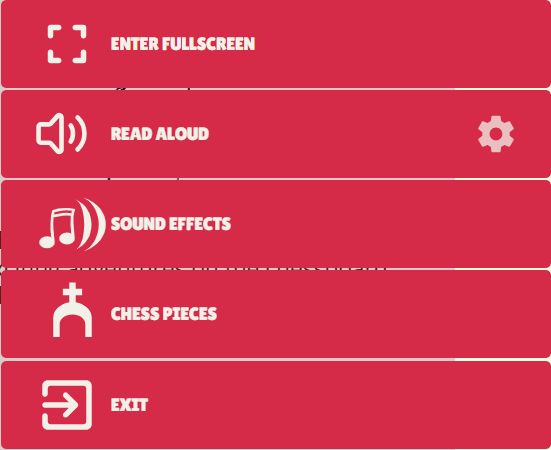
Does the reading voice sound wrong, robotic, or does nothing happen at all?
You are not doing anything wrong, and nothing is broken. Here is what is going on, and how to fix it in a few minutes.
Microsoft, Google and Apple add new voices and new languages all the time, so every list on this page carries the date we last checked it. If one looks out of date to you, write to us and we will check it again.
The voice is not ours
LearningChess does not record the lessons. When you turn on reading, we hand the text to your own device and ask it to speak. The voice you hear belongs to your browser and your operating system — not to us.
That is good news, because it means you can choose a better one. It also explains why the same lesson sounds excellent on one computer and poor on another, and why your language may be read with a foreign accent, or not read at all.

The quickest fix: use Microsoft Edge
If you are on a Windows PC or a Mac, install or open Microsoft Edge and try the lesson again. Edge comes with a very large set of natural-sounding online voices, and it is the only browser that can read all fourteen of our languages.
For comparison, on a typical Windows computer Edge offered more than 300 voices, Chrome around 20, and Firefox only the handful installed on the machine itself.
Chrome reads English, Spanish, French and Portuguese well. For Czech, Slovak, Norwegian, Hungarian, Greek, Arabic, Tamil, Vietnamese and Sinhala, Edge is the one to use.

Windows
To add a voice for your language:
- Open Settings → Time & language → Language & region.
- Find your language in the list, click the three dots next to it and choose Language options.
- Under Speech, click Download.
- Close your browser completely and open it again.
One thing to watch for. A voice that came with some other program may work in that program and still be invisible to your browser. If you installed a voice elsewhere and we still cannot use it, add it again through Settings as above — that is the one place browsers look.
Which browser reads which language on Windows
Edge needs no installation at all for any of these languages, because its voices come over the internet. Where the table says a Windows voice is needed, that is the Download step above.
| Your language | Edge | Chrome | Firefox |
|---|---|---|---|
| English | ✔ | ✔ | ✔ |
| Spanish | ✔ | ✔ | Needs a Windows voice |
| French | ✔ | ✔ | Needs a Windows voice |
| Portuguese | ✔ | ✔ | Needs a Windows voice |
| Hungarian | ✔ | Needs a Windows voice | Needs a Windows voice |
| Czech | ✔ | Needs a Windows voice | Needs a Windows voice |
| Slovak | ✔ | Needs a Windows voice | Needs a Windows voice |
| Norwegian | ✔ | Needs a Windows voice | Needs a Windows voice |
| Greek | ✔ | Needs a Windows voice | Needs a Windows voice |
| Arabic | ✔ | Needs a Windows voice | Needs a Windows voice |
| Tamil | ✔ | Needs a Windows voice | Needs a Windows voice |
| Vietnamese | ✔ | Needs a Windows voice | Needs a Windows voice |
| Sinhala | ✔ | Needs a Windows voice | Needs a Windows voice |
Last checked: October 19, 2026.
Windows does not offer a voice for every one of these languages. If step 3 above shows no Download button under Speech, there is none to install — and Edge is your answer.

Mac
- Open System Settings → Accessibility → Spoken Content.
- Click the System Voice menu, then Manage Voices….
- Tick the voices you want and let them download. The ones marked as higher quality are worth the wait.
- Restart your browser.
Which browser reads which language on a Mac
Safari speaks with the voices Apple supplies, so what it can read is decided by Apple’s own list. Edge and Chrome bring their voices over the internet instead, and on a Mac they offer exactly what they offer on a Windows PC. A tick under Safari means the voice is there to download, as described above.
| Your language | Safari | Edge | Chrome |
|---|---|---|---|
| English | ✔ | ✔ | ✔ |
| Spanish | ✔ | ✔ | ✔ |
| French | ✔ | ✔ | ✔ |
| Portuguese | ✔ | ✔ | ✔ |
| Hungarian | ✔ | ✔ | ✖ |
| Czech | ✔ | ✔ | ✖ |
| Slovak | ✔ | ✔ | ✖ |
| Norwegian | ✔ | ✔ | ✖ |
| Greek | ✔ | ✔ | ✖ |
| Arabic | ✖ | ✔ | ✖ |
| Tamil | ✔ | ✔ | ✖ |
| Vietnamese | ✔ | ✔ | ✖ |
| Sinhala | ✖ | ✔ | ✖ |
Last checked: October 19, 2026.
For Arabic and Sinhala, Apple does not currently list a voice at all, so Safari will stay silent however many times you look through Manage Voices. Install the free Microsoft Edge and the lesson will be read.

Android phones and tablets
Android lets you choose which speech program your phone uses, and your browser follows that choice.
On most Android phones (Google Pixel, Xiaomi, Motorola, Nokia and others):
- Open Settings → Accessibility → Text-to-speech output.
- Check the Preferred engine — Google Speech Services works well for most languages.
- Tap Install voice data (or the gear icon next to the engine) and download your language.
- Use the Play button there to hear it before you return to the lesson.
On Samsung phones and tablets the language files live somewhere else:
- Open Settings → General management → Language pack and download your language.
- Then go to Settings → Accessibility → Text-to-speech output to choose which speech program to use.
If you cannot find these menus, type text-to-speech into the search box at the top of Settings — every Android version will take you to the right place.
Which language your Android phone can read
Google’s own speech program covers almost every language we teach in. Download yours as described above, and whichever browser you normally use will find it.
| Your language | With Google Speech Services |
|---|---|
| English | ✔ |
| Spanish | ✔ |
| French | ✔ |
| Portuguese | ✔ |
| Hungarian | ✔ |
| Czech | ✔ |
| Slovak | ✔ |
| Norwegian | ✔ |
| Greek | ✔ |
| Arabic | ✔ |
| Tamil | ✔ |
| Vietnamese | ✔ |
| Sinhala | ✖ |
Last checked: October 19, 2026.
Two things can still get in the way. Your phone may be set to use a different speech program than Google’s — check the Preferred engine as in step 2 above. And a few phone models, in a few countries, are sold without some of these languages. If yours is missing, a computer with Microsoft Edge will always read the lesson.
The exception is Sinhala. Google’s speech program does not offer a Sinhala voice, and on Android every browser speaks with the system’s chosen speech program — so changing browser will not help. A separate speech program from the Play Store may work if you find one that offers Sinhala and set it as the preferred engine. The simpler answer is a Windows PC or a Mac with Microsoft Edge, which reads Sinhala well.

iPhone and iPad
- Open Settings → Accessibility → Spoken Content → Voices.
- Choose your language and download a voice. The Enhanced or Premium versions sound much better than the default.
- Go back to the lesson in Safari and try again.
Please note: on iPhone and iPad only Apple’s own voices can be used by a browser. Apps from the App Store that read text aloud can only do so inside themselves, so buying one will not change what you hear in a lesson. Everything you need is in the Settings screen above, free of charge.
Which language your iPhone or iPad can read
Here the browser makes no difference at all: Safari, Chrome and every other browser on iPhone and iPad use Apple’s voices. So the only question is whether Apple offers a voice for your language.
| Your language | Apple voice available |
|---|---|
| English | ✔ |
| Spanish | ✔ |
| French | ✔ |
| Portuguese | ✔ |
| Hungarian | ✔ |
| Czech | ✔ |
| Slovak | ✔ |
| Norwegian | ✔ |
| Greek | ✔ |
| Arabic | ✖ |
| Tamil | ✔ |
| Vietnamese | ✔ |
| Sinhala | ✖ |
Last checked: October 19, 2026.
If you are learning in Arabic or Sinhala, we are sorry to say that an iPhone or iPad cannot read the lessons aloud today, and no app from the App Store can change that. On a Windows PC or a Mac, Microsoft Edge reads both well. Everything else in the lesson works on your iPad exactly as before.
Do paid voice apps help?
Sometimes, and it depends on your device.
- Windows: yes, if the voice installs itself as a system voice — one your whole computer can use, not only the program you bought.
- Mac: in principle yes, and Apple does not block it the way it does on iPhone. In practice very few companies still sell voices for the Mac, and some older ones no longer work on recent versions. Ask the seller whether their voice appears in System Settings → Accessibility → Spoken Content before you buy — if it does not appear there, your browser will not find it either.
- Android: yes, if you set it as the preferred engine in the Text-to-speech settings described above.
- iPhone and iPad: no. See the note above.
Before spending anything, do try Edge and the free system voices first. In most cases they solve the problem completely.
Which browser for which language
We promised this list when text-to-speech launched. This is the short version, for a computer. If you know which device you are on, the section for Windows, Mac, Android or iPhone and iPad has a more exact answer for your own system.
| Your language | What we recommend on a computer |
|---|---|
| English | Chrome, Edge or Safari — all read it well |
| Spanish | Chrome, Edge or Safari |
| French | Chrome, Edge or Safari |
| Portuguese | Chrome, Edge or Safari |
| Hungarian | Edge |
| Czech | Edge |
| Slovak | Edge |
| Norwegian | Edge |
| Greek | Edge |
| Arabic | Edge |
| Tamil | Edge |
| Vietnamese | Edge |
| Sinhala | Edge |
Last checked: October 19, 2026.
Where the table says Edge, it is not a preference — those languages have no voice at all in Chrome or Firefox, so nothing will be read aloud there.
On a phone or tablet the browser matters much less. Download the voice for your language as described above, and whichever browser you normally use will find it.

Still not working?
Write to us through the Contact Us page and tell us three things: which device you use, which browser, and which language you are learning in. That is usually enough for us to tell you exactly which voice to install.
Happy learning,
The LearningChess Team

Paschal
May 9, 2026 at 5:41 pm
Paschal from Ireland,
Congratulations to the learning chess team with this new initiative ; text to speech to enhance the learning chess lessons.
As a chess player who will be celebrating a significant milestone birthday next month, this is a perfect birthday present! It makes me more alert and I really feel , I am learning chess in a fun way but also educationally as well. The lessons sometimes can be challenging but it’s worth it when I can use my knowledge to beat an opponent in a chess game with my local chess club. It is certainly a great feeling and you are on top of the world. Thanks LearningChess.net.
I had no trouble with my browser which is chrome for my desktop and I can’t wait to use it on my mobile. You really have surpassed yourselves and I am really happy to have found your website some years ago.
I highly recommend LearningChess.net to anyone who wants high quality chess education in a playful way, no matter what age you are!!
Janka
May 9, 2026 at 7:00 pm
Thank you for your feedback and kind words! Happy early birthday. I wish you all the best and lots of success in chess. Janka
Bharmandi
August 26, 2026 at 5:27 pm
Please make me learn chess free in online please
JohnnyP
September 9, 2026 at 8:08 am
Take advantage of the wide range of free content available on LearningChess:
– 50 Grandmaster lessons: https://learningchess.net/us/lessons?cid=2
– 20 Board Buddies lessons: https://learningchess.net/us/lessons?cid=11
– Play different chess variations and minigames
– Tactics Trainer with thousands of puzzles
You can try three free sample lessons from our Level 1-2-3 and Active Opening Repertoire courses.